
Reserved slots: keep places for your members, VIPs or team
Keep cars on your Assetto Corsa server for a list of drivers or for one driver, live and without restarting, and automate it with your shop or bot.
Reserved Slots keep places in your cars for a list of drivers (VIPs, staff, a team) or for one driver. Anyone can pick any car in Content Manager; a player who takes a place kept for others reads your message once their game has loaded, and is kicked 8 seconds later. Changes count from the next player who joins, without restarting the server.
- See the places now. Now on the server, at the top of the page, shows each car's places while the server runs: how many are taken, kept and free for anyone.
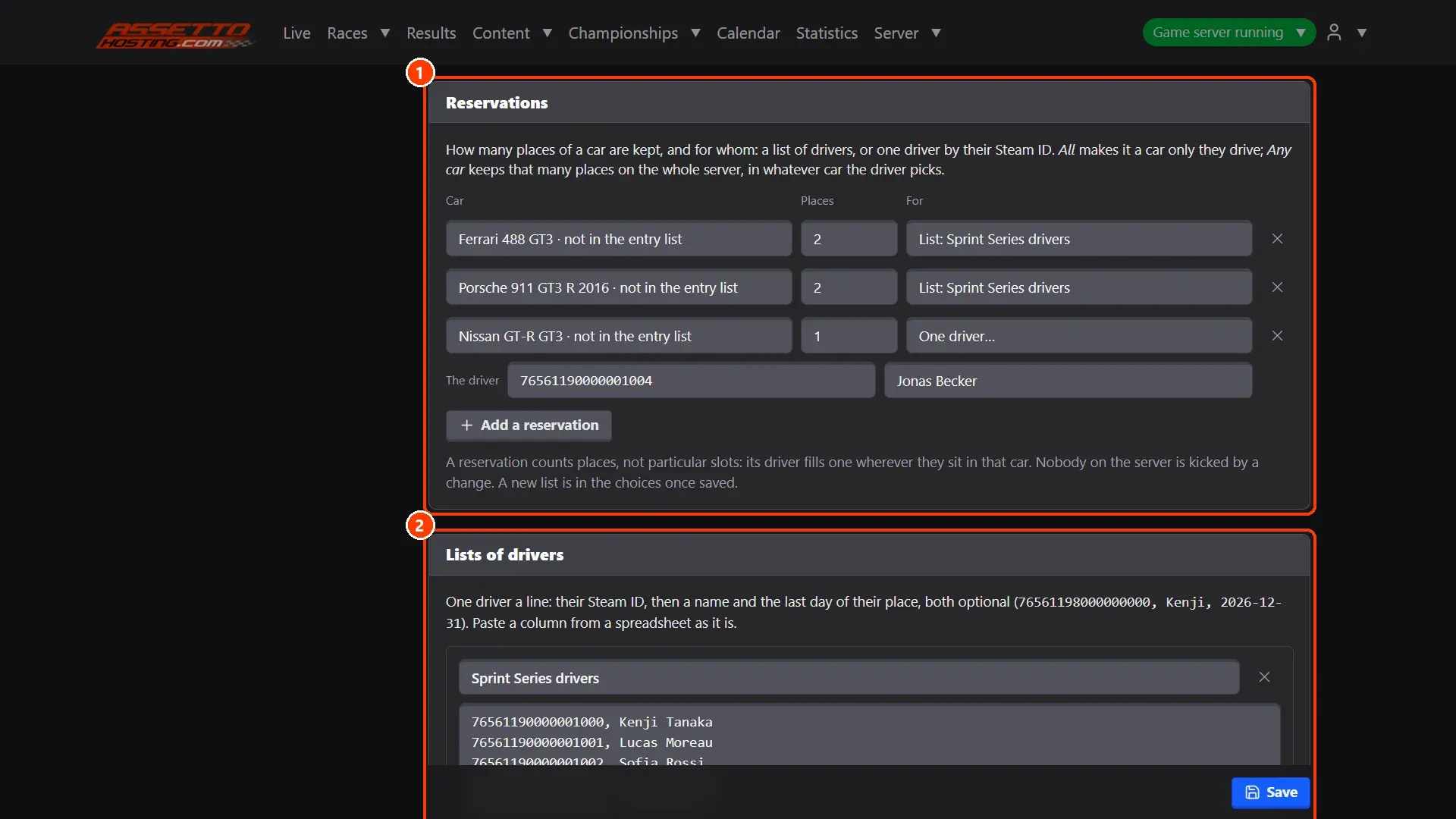
- Reservations and lists of drivers. ** Reservations**: places of a car kept for a list or for one driver.
What you need
- An Assetto Corsa server with Assetto Corsa Server Manager: every AssettoHosting.com Assetto Corsa server comes with it.
Step by step
- See the places now
Now on the server, at the top of the page, shows each car's places while the server runs: how many are taken, kept and free for anyone.
- Reservations and lists of drivers
(1) Reservations: places of a car kept for a list or for one driver. (2) Lists of drivers: a name and its drivers' Steam IDs (your VIPs, your staff). Below them, Message is what a player reads in the chat before being kicked.
On AssettoHosting.com
Run your community from the browser
Assetto Corsa Server Manager 2.0 is the control panel of every Assetto Corsa server at AssettoHosting.com. Greet players with welcome and timed messages, keep places for your members with reserved slots and ban who you must.
- Welcome and timed messages
- Reserved slots and blacklist
- Immediate deployment, cancel anytime
Good to know
- Players › API Keys lets your shop, Patreon or Discord bot add a driver to a list when they pay.
Assetto Corsa Server Manager
Frequently asked questions
No: changes count from the next player who joins.
Keep reading: Ban a driver from your Assetto Corsa server: the blacklist · Connect your website, Discord bot or overlay: the General API · All 28 Assetto Corsa Server Manager tutorials