

How to Use Custom Maps on BeamMP
Follow this tutorial to add modded maps to your AssettoHosting.com server
Requirements
- A working BeamMP Server
- The custom map (.zip file)
- New to mods? Start with how to add mods to a BeamMP server
Installation Steps
- Upload the Map File
In your control panel, open Content › Mods and drag the map’s .zip into the browser. Hosting it yourself? Put the .zip in
Resources/Client. - Check the Map Internal Name
Open the
.zipfile on your computer.
Navigate to the levels folder.Note the name of the folder inside
levels.
This is the Internal Name you need for the configuration. - Edit Configuration
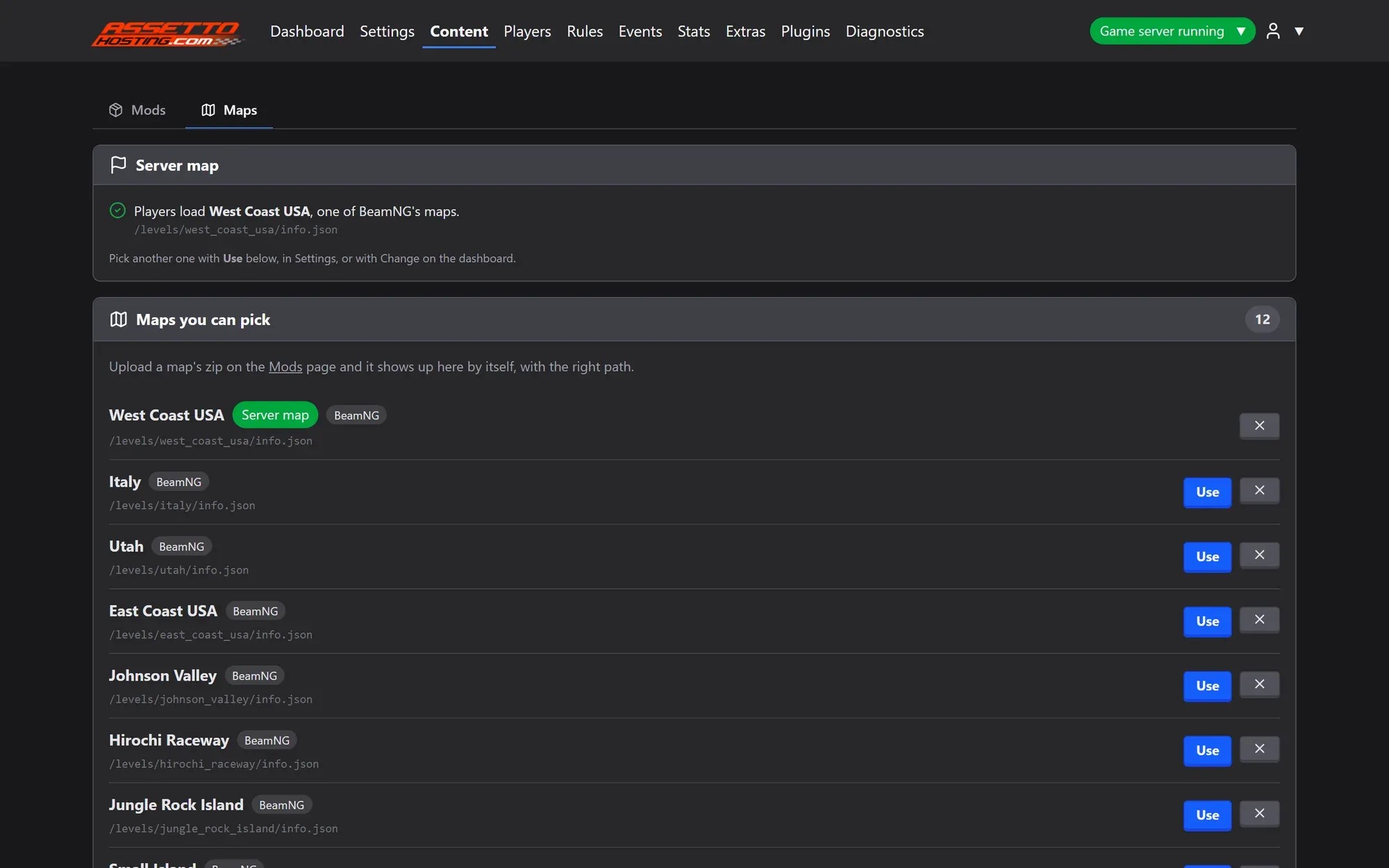
On AssettoHosting the map appears under Content › Maps with its path: click Use. Hosting it yourself? In
ServerConfig.toml, setMap = "/levels/folder_name/info.json"with the folder from Step 2.
You must open each .zip file to verify its internal layout. If it does not match your other maps, you will need to unzip and reorganize the files or edit the path to match the map's internal structure.
Regardless of the folder name, you must write the map name in all lowercase inside the config.toml. Example: If the folder is MyCustomMap, write mycustommap.
On AssettoHosting
Upload the .zip, the map adds itself
The BeamMP Server Manager reads each zip, finds the map’s folder inside levels and adds it with the right path. Zipped the wrong way? It is fixed in one click, and a wrong path is caught before players see “Map not found”.
- Drag and drop uploads, big files in parts
- Maps added with the right path
- Switch the server map with one click
Rolling out now: the new panel is being installed on every server step by step, and all of them will have it by Monday, October 26.
Popular Map Path Directory
Click the copy button to quickly get the path for your config.toml:
| Map Name | Config Path |
|---|---|
| 4x4 Island | /levels/4x4_island/info.json |
| Alivieska (MSC) | /levels/alivieska/info.json |
| American Road | /levels/mymap/info.json |
| Atlanto | /levels/atlanto/info.json |
| Austrian Drag Strip | /levels/austriandragstriprevamped/info.json |
| Bristol Motorspeedway | /levels/bristol-motorspeedway/info.json |
| Camodo Crater | /levels/camodo_crater/info.json |
| Cliff Roads | /levels/cliffroads/info.json |
| Cyberpunk District | /levels/IvlaxDistrict/info.json |
| Deals Gap | /levels/dealsgap/info.json |
| Drift Playground | /levels/driftplayground/info.json |
| Ebisu Kita | /levels/ebisu_kita/info.json |
| Fujigoko | /levels/fujigoko/info.json |
| Imola | /levels/ks_imola/info.json |
| Laguna Seca | /levels/ks_laguna_seca/info.json |
| Le Mans | /levels/lemans/info.json |
| Liberty City | /levels/liberty_city/info.json |
| Monza | /levels/RB_KS_Monza/info.json |
| Mount Akina | /levels/idas0akina/info.json |
| Nordschleife | /levels/ks_nord/info.json |
| Pikes Peak | /levels/pikespeak/info.json |
| Spa Francorchamps | /levels/ks_spa/info.json |
| Tokyo Highway | /levels/tokyo_highway/info.json |